 CREATION PLUS
 HP Pavilion Desktop TP01 Review: A Comprehensive Technical Analysis
An in-depth technical analysis of the HP Pavilion Desktop TP01 series, exploring performance across Intel and AMD hardware generations, design, value, and limitations.
About this analysis: we did not test this product ourselves. This article compiles the official specifications and benchmark results published by independent reviewers – every chart and table names its source.
The HP Pavilion Desktop TP01 series represents HP's mainstream budget desktop lineup, strategically positioned between the entry-level HP Slim and Essential lines and the higher-end Envy family. Extensively evaluated across multiple hardware generations—notably the Intel Core i3-powered TP01-0014 and the AMD Ryzen 7 5700G-powered TP01-2060—the TP01 chassis is designed to deliver general productivity, student tasks, and family computing in a compact, modern form factor. Base configurations start at an MSRP of $549, while street pricing and higher-tier hardware variations span upwards to $757. Reviewers and owners alike look to this versatile tower for everyday home and office environments where reliability and a clean aesthetic take precedence over heavy gaming or extreme multi-threaded rendering. Understanding how this chassis has evolved across different processor iterations provides valuable insight into what buyers can expect from modern mainstream pre-built desktop computers.
Specifications
The HP Pavilion Desktop TP01 lineup encompasses diverse hardware configurations tailored to different budget and performance levels. Below is an overview of the key specifications for the tested TP01-2060 and TP01-0014 models.
| Processor | |
|---|---|
| CPU (TP01-2060) | AMD Ryzen 7 5700G (8 cores, 3.8 GHz base, 4.6 GHz boost) |
| CPU (TP01-0014) | Intel Core i3-8100B (4 cores, 3.6 GHz) |
| Graphics | |
| Graphics (TP01-2060) | AMD Radeon Graphics (integrated) |
| Graphics (TP01-0014) | Intel UHD Graphics 630 (integrated) |
| Memory | |
| RAM (TP01-2060) | 16 GB DDR4 (2x DDR4 slots on motherboard) |
| RAM (TP01-0014) | 8 GB DDR4-2666 |
| Storage | |
| Boot Drive (TP01-2060) | 256 GB SSD (M.2 2280) |
| Secondary Storage (TP01-2060) | 1 TB Hard Drive (3.5-inch) |
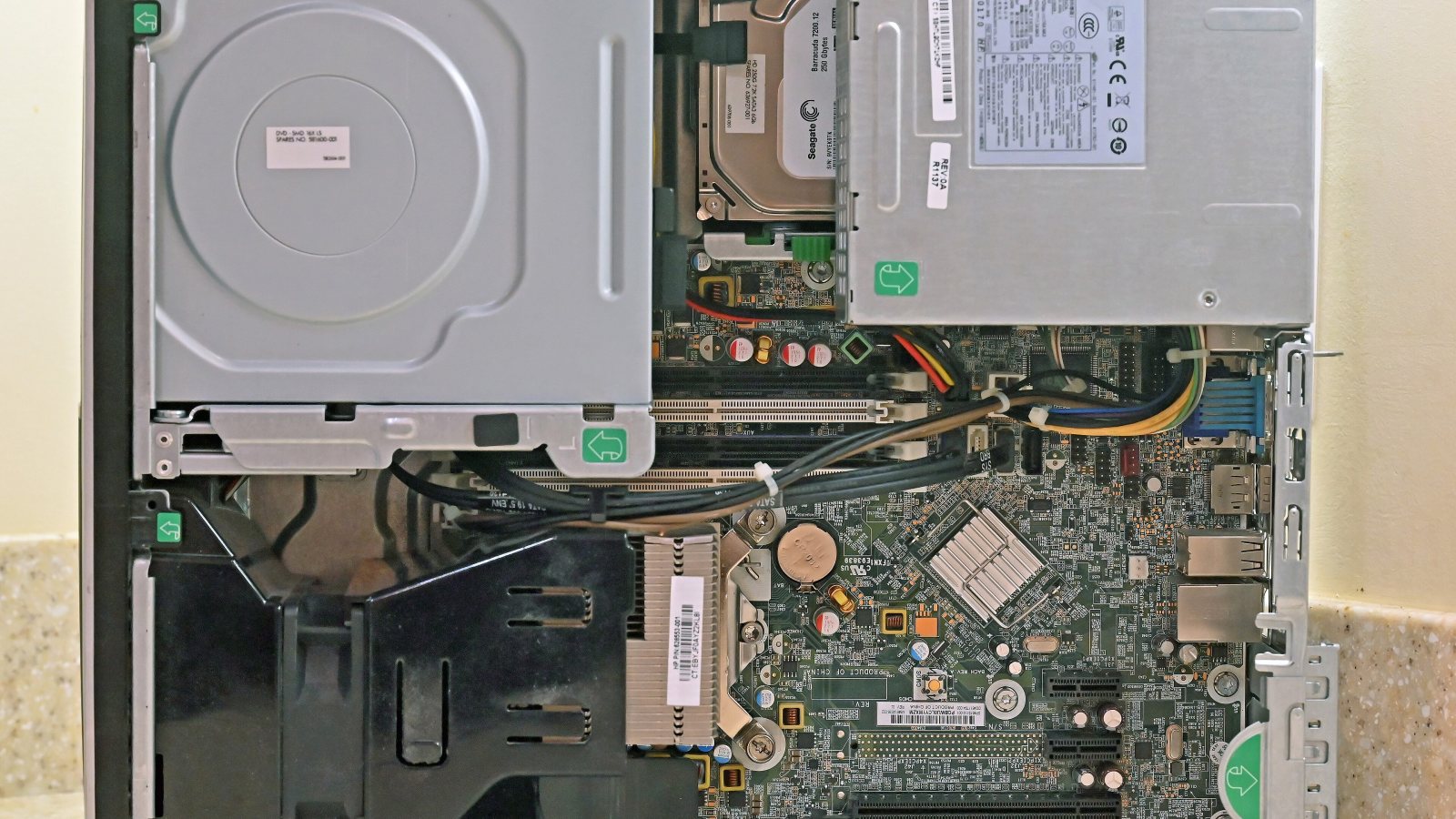
| Storage Expansion Bays | 1x 2.5-inch bay, 1x secondary 3.5-inch top cage bay (with SATA and power cables in place), 2x M.2 slots |
| Optical Drive | |
| Optical Drive (TP01-0014) | Tray-loading DVD Writer |
| Connectivity | |
| Wireless (TP01-2060) | Wi-Fi 5 (802.11ac) and Bluetooth 4.2 |
| Wireless (TP01-0014) | 802.11ac Wi-Fi and Bluetooth 5.0 |
| Ethernet | Gigabit Ethernet (RJ-45) |
| Ports | |
| Front Ports | 4x USB 3.2 Gen 1 Type-A (5Gbps), 1x USB Type-C, 1x 3.5mm audio combo jack, 1x full-size SD card reader |
| Rear Ports | 4x USB 2.0 Type-A, 1x HDMI 2.0b, 1x VGA, 1x Gigabit Ethernet, 3x audio jacks (line-in, line-out, mic) |
| Expansion | |
| Expansion Slots | 1x PCI Express x16, 1x PCI Express x1, 1x M.2 2280 (for SSD), 1x M.2 2230 (for wireless card) |
| Dimensions | |
| Chassis Dimensions (HWD) | 13.3 x 6.1 x 12 inches |
| Motherboard Dimensions | 11.25 x 8 inches |
| Weight | Approximately 13 lbs |
| Power | |
| Power Supply | 180 Watts (internal, without GPU PCIe auxiliary power connectors) |
| Operating System | |
| Operating System | Windows 11 Home (TP01-2060) / Windows 10 Home (TP01-0014) |
As outlined in the specifications table, the TP01 platform has bridged multiple processor generations, shifting from older quad-core Intel architectures up to powerful eight-core AMD Ryzen processing solutions. This hardware flexibility allows HP to target a broad audience, ranging from budget-conscious shoppers needing basic web browsing tools to users requiring robust multi-threaded computing power for daily office workflows.
Design, Build & Features
In terms of physical characteristics, the TP01 desktop measures 13.3 by 6.1 by 12 inches (HWD) and weighs approximately 13 pounds. Reviewers praised its aesthetic compared to dated office desktops, highlighting its light silver brushed faceplate with rounded edges and sturdy rubber feet. The construction utilizes thinly rolled steel, which contributes to a lightweight, hollow feel, but the exterior presentation remains clean and presentable in desktop or under-desk setups. The brushed texture effectively masks fingerprints and gives the illusion of a more premium product than traditional matte-black office boxes.
Connectivity is a standout aspect of the chassis front, which provides quick access to four USB Type-A ports (supporting 5Gbps USB 3.2 Gen 1 speeds), a USB Type-C port, a full-sized SD card slot, and an audio combo jack. Some configurations, such as the TP01-0014, also incorporate a tray-loading optical DVD writer for legacy media integration. However, reviewers criticized the rear port selection: while it includes Gigabit Ethernet and multiple audio jacks, the four rear USB Type-A ports are restricted to legacy USB 2.0 speeds, making them slow for modern external hard drives. Furthermore, video outputs on the TP01-2060 consist of a single HDMI 2.0b port and an aging analog VGA port, creating limitations for dual-monitor workflows without adapters. Wireless connectivity on the tested TP01-2060 model features older Wi-Fi 5 (802.11ac) and Bluetooth 4.2 rather than Wi-Fi 6, whereas the TP01-0014 featured Bluetooth 5.0 alongside 802.11ac Wi-Fi.
Performance
General Productivity and Computing
Performance evaluations vary considerably depending on the installed processor. The budget Core i3-8100B configuration in the TP01-0014 proved sufficient for basic tasks like web browsing and office productivity, but lagged behind quad-core and six-core peers in heavy multi-threaded rendering and encoding tests. Conversely, the TP01-2060 outfitted with AMD's 8-core, 16-thread Ryzen 7 5700G delivered robust computing power, registering an impressive 6,391 points in PCMark 10, comfortably surpassing the 4,000-point threshold for everyday responsiveness. This ensures seamless multitasking across heavy browser tabs, spreadsheet applications, and communication software.
Integrated Graphics and Gaming
While the AMD Ryzen 7 5700G provides capable integrated Radeon graphics for basic media consumption and light titles, integrated GPU gaming remains limited. Reviewers and data sources highlight that retail configurations shipping with single-channel memory significantly cripple integrated gaming and computing performance compared to dual-channel setups. For users looking at integrated graphics benchmarks, the relative scaling is mapped below.
Source: tomshardware.com
At lower resolutions like 1280x720, the integrated graphics architecture shows further scaling behavior relative to baseline configurations, as illustrated in secondary benchmark evaluations.
Source: tomshardware.com
As these charts demonstrate, keeping memory configurations optimized is vital for squeezing maximum utility out of the integrated graphics core. Without dual-channel memory bandwidth, graphical frame rates drop precipitously, turning casual gaming experiences into stuttering slideshows.
Power, Thermals & Noise
Internal power delivery is handled by a proprietary 180-watt internal power supply unit. Reviewers noted that this low-capacity power supply lacks supplemental PCIe power cables, heavily constraining discrete graphics card additions to minimal low-power add-in boards that draw power exclusively from the PCIe slot. Regarding acoustics and thermal management during daily operation, owner feedback and evaluations confirm that the chassis runs quietly during routine use, with cooling fans only becoming audible without being intrusive under heavy CPU loads. The cooling solution handles thermal output adequately for stock non-overclocked processors, though the lack of advanced chassis airflow paths means high ambient room temperatures can prompt louder fan spins during prolonged rendering jobs.
Competition
The mainstream desktop market features several strong alternatives competing directly against the HP Pavilion Desktop TP01 series, including options detailed in reviews like our Acer Aspire TC review.
| Model | Processor | Storage | Networking | Price |
|---|---|---|---|---|
| Acer Aspire TC (TC-1760-UA92) | 12th Generation Intel Core i5 | 512GB SSD | Wi-Fi 6 | $559 |
| Dell Inspiron Desktop (3910) | Intel Core i7-12700 | Not specified | Not specified | $799 |
| Lenovo IdeaCentre 3i | Intel Core i7-12700 | Not specified | Not specified | $759 |
Source: pcmag.com
When selecting among alternatives, buyers should weigh specific hardware advantages. The Acer Aspire TC (TC-1760-UA92) priced at $559 offers a 12th Generation Intel Core i5 processor, a larger 512GB SSD boot drive, and modern Wi-Fi 6 networking, making it a formidable direct competitor for value seekers. Meanwhile, models like the Dell Inspiron Desktop (3910) at $799 and the Lenovo IdeaCentre 3i at $759 step up to Intel Core i7-12700 processors, catering to users who require higher multi-core compute capability out of the box right away.
Price & Value
Base configurations of the HP Pavilion Desktop TP01 start at $549 MSRP, making it an accessible entry point for home and office buyers. The reviewed TP01-0014 configuration retailed at a lower budget price of $499, while the more capable, Ryzen 7 5700G-powered TP01-2060 configuration was priced at $757 street. Considering its generous front-panel I/O, included wired mouse and keyboard, and quiet operation under load, the TP01 offers solid value for standard productivity tasks, provided buyers verify whether their specific model features dual-channel memory configuration to avoid performance bottlenecks.
What Owners Say
Owner feedback highlights several recurring themes regarding the HP Pavilion Desktop TP01 series. On the positive side, users frequently praise the system for running quietly during routine use and appreciate the attractive brushed silver front panel that fits neatly into modern workspaces. Conversely, common criticisms focus on the motherboard firmware providing no user-configurable options or settings for tuning and memory manipulation, the thin rolled-steel chassis giving an overly hollow feel despite its light weight, and retail configurations shipping with single-channel memory that restricts integrated graphics potential.
Who Should Buy It / Who Should Skip It
You should buy this if: You need a quiet, dependable desktop for everyday home office tasks, web browsing, and student workflows, and you appreciate generous front-panel connectivity including an SD card reader and USB-C port.
You should skip this if: You plan on installing a dedicated mid-to-high-end graphics card (due to the 180W power supply limitation), require advanced BIOS tuning options, or need modern dual digital display outputs without relying on legacy VGA connections.
Verdict
The HP Pavilion Desktop TP01 series is a capable, space-saving mainstream tower that delivers reliable productivity and quiet operation. While it faces limitations regarding power supply wattage, legacy rear ports, and single-channel memory configurations in certain retail builds, its attractive aesthetic, comprehensive front I/O, and strong multi-core processing power on Ryzen configurations make it a sensible choice for general home and office environments.
Pros
- Brushed silver front panel provides an attractive, modern aesthetic
- Generous front-panel I/O with four USB Type-A ports, a USB-C port, and an SD card reader
- Good internal serviceability with multiple drive bays, dual M.2 slots, and PCIe slots
- Dual-storage combination on TP01-2060 pairs a fast boot SSD with a spacious 1TB hard drive
- Includes wired mouse and keyboard out of the box
Cons
- Low-capacity 180-watt power supply lacks auxiliary PCIe power connectors, severely limiting dedicated GPU upgrades
- Rear USB ports are limited to slow legacy USB 2.0 speeds
- Display output is limited to a single HDMI port and an outdated VGA connector, lacking dual modern digital outputs
- Ships with older Wi-Fi 5 and Bluetooth 4.2 rather than Wi-Fi 6 on tested configurations
Frequently asked questions
What is the starting MSRP of the HP Pavilion Desktop TP01 series?
Base configurations of the HP Pavilion Desktop TP01 series start at an MSRP of $549, with tested variants like the TP01-2060 reaching a street price of $757.
What processors are available in the HP Pavilion Desktop TP01?
The lineup includes various processors depending on the generation, ranging from the Intel Core i3-8100B in the TP01-0014 to the powerful AMD Ryzen 7 5700G found in the TP01-2060.
Can I upgrade the graphics card in the HP Pavilion Desktop TP01?
Discrete GPU upgrades are heavily restricted because the system utilizes a proprietary 180-watt power supply that lacks auxiliary PCIe power connectors.
What front-panel ports does the TP01 chassis feature?
The front panel includes four USB 3.2 Gen 1 Type-A ports, a USB Type-C port, a 3.5mm audio combo jack, and a full-size SD card reader.
Does the motherboard allow for memory and system tuning?
No, user feedback and reviews note that the motherboard firmware provides no user-configurable options or settings for tuning and memory manipulation.