 CREATION PLUS
 Budget Gaming Laptop vs Steam Deck: Which Is Worth Your Money?
Choosing between an entry-level gaming laptop and Valve's handheld comes down to raw graphical muscle versus on-the-go convenience. Here is how their performance, displays, and real-world costs compare.
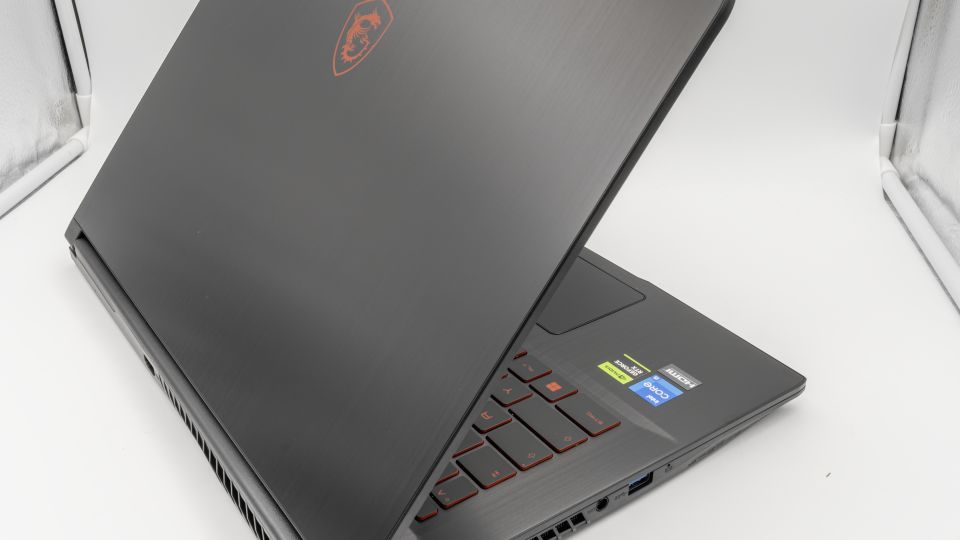
When deciding between a budget gaming laptop vs steam deck, your choice hinges on a direct trade-off between raw computing power and console-style handheld portability. An entry-level gaming laptop brings a standard Windows environment, a dedicated graphics processor, and an integrated keyboard and display ready for everyday school or office workloads. Conversely, Valve's Steam Deck provides a streamlined, controller-driven setup that lets you play PC releases anywhere without needing a desk or an external mouse.
Both devices serve as primary entry points for PC gaming on a modest budget, yet they suit completely different gaming habits. Drawing on manufacturer technical specifications, published benchmark testing, and community owner feedback, this guide examines how both platforms compare across performance benchmarks, display clarity, software ecosystems, and total setup expenses.
Budget Gaming Laptop vs Steam Deck: Hardware and Raw Benchmarks
While both machines run PC titles, their internal hardware targets vastly different thermal envelopes and power limits. In standardized 3DMark Time Spy synthetic tests compiled in IGN's benchmark comparison, the Steam Deck's custom AMD APU scored 1,715 points. By contrast, an older entry-level gaming laptop equipped with an Nvidia GeForce GTX 1650 scored 3,764—more than double the Deck's output. Even standard thin-and-light laptop integrated graphics, such as Intel Iris Xe, delivered a comparable 1,837 points in the same benchmark.
As detailed in PCMag's graphics performance testing, dedicated gaming laptops easily outpace the Steam Deck in raw rendering horsepower. Contemporary budget laptops feature multicore AMD Ryzen or Intel Core CPUs (frequently 8 cores) alongside discrete mobile GPUs like the Nvidia GeForce RTX 3050 or RTX 40-series mobile chips. These standalone laptop graphics chips have access to independent video memory and substantially higher power allocations. While a gaming laptop can pull well over 250 watts from the wall under full load to sustain peak clocks, the Steam Deck operates on a compact, highly efficient custom APU designed to conserve power inside a handheld chassis.
| Hardware Feature | Valve Steam Deck (LCD / OLED) | Budget Gaming Laptop |
|---|---|---|
| Starting Price | $399 (256GB LCD) / $549 (512GB OLED) | Typically $600 to $800+ |
| Target Resolution | 1280 x 800 (16:10 aspect ratio) | 1920 x 1080 (16:9 Full HD) |
| Screen Size | 7-inch display (LCD / OLED variants) | Typically ~15.6 inches |
| Graphics Architecture | Custom AMD APU (shared system memory) | Discrete mobile GPU (GTX 1650, RTX 3050/40-series) |
| Peak Power Consumption | Low-wattage handheld APU (~15W TDP) | Can exceed 250W wall draw under full load |
| Operating System | SteamOS (Arch Linux-based) | Windows 11 Home |
| Input Method | Integrated thumbsticks, D-pad, trackpads, triggers | Built-in keyboard and trackpad (mouse recommended) |
Display Reality: Understanding 800p on 7 Inches vs. 1080p on 15 Inches
Spec sheets show the Steam Deck outputting an 800p native image, while laptops display at 1080p. On paper, 800p sounds like a compromise, but visual clarity depends heavily on screen size and pixel density. On a compact 7-inch display, 800p maintains tight pixel packing, producing a crisp image during handheld gameplay without requiring the GPU to render millions of surplus pixels.
Rendering at 800p cuts the graphical workload roughly in half compared to rendering at 1080p. This performance dividend enables the Steam Deck to maintain stable, fluid frame rates on optimized titles such as Borderlands 3 and Hitman 3. However, the Steam Deck's custom APU hits a distinct performance ceiling when tasked with demanding AAA titles. Heavy games like Metro Exodus and Horizon Zero Dawn struggle to maintain consistent frame rates without aggressive visual scaling.
A budget gaming laptop uses a much larger ~15-inch screen. Lowering resolution to 800p on a display that large produces noticeable blurriness, making native 1080p a visual requirement. While modern budget laptops carry the discrete graphical muscle necessary to drive 1080p at smooth frame rates, that extra rendering power is required simply to keep games looking sharp on the larger panel.
Portability, Acoustics, and Battery Life Under Load
Portability means different things depending on your environment. A gaming laptop is transportable—it packs into a backpack and travels easily from home to a dorm or office. However, playing games on a laptop requires a level desk surface, clear space for an external mouse, and room for a sizable power adapter.
The Steam Deck provides genuine handheld mobility. You can play comfortably on an airplane tray table, on a couch, or in bed without balancing a hot chassis on your lap. Its integrated controls, dual trackpads, and ergonomic grips eliminate the need for extra peripherals while traveling.
Neither system excels at unplugged battery life when running graphically demanding games. Testing shows that running a heavy release like Cyberpunk 2077 on an unplugged gaming laptop exhausts the battery in under two hours before requiring a wall outlet. The Steam Deck fares slightly better under heavy gaming loads because it powers a smaller panel and a low-draw APU, though demanding AAA titles still drain the battery rapidly.
Acoustic and thermal profiles also differ markedly. Budget gaming laptops often generate significant fan noise and chassis heat when the GPU and CPU run concurrently. The Steam Deck generates heat through its top exhaust vent, keeping warmth away from your hands, though its internal fan also ramps up during heavy gaming sessions.
Operating System Flexibility: SteamOS vs. Windows 11
Your software needs should heavily influence your purchasing choice. The Steam Deck runs Valve's custom Linux distribution, SteamOS. For games marked as Steam Deck Verified, the operating system delivers a console-like experience with reliable sleep-and-resume functionality that Windows devices struggle to match.
However, running games from outside the Steam ecosystem—such as the Epic Games Store, GOG, or PC Game Pass—requires community utilities, custom launchers, or third-party compatibility layers. Additionally, competitive multiplayer titles that enforce kernel-level anti-cheat software often fail to launch on SteamOS entirely.
A budget gaming laptop operates on standard Windows 11. It provides native, out-of-the-box compatibility with every PC gaming storefront, anti-cheat system, and productivity suite. If your routine includes writing papers, manipulating spreadsheets, editing media, or joining video calls, a Windows laptop handles those tasks without friction.
The Hidden Cost of Using a Handheld as a Desktop PC
At $399 for the 256GB LCD model and $549 for the 512GB OLED model, the Steam Deck undercuts virtually every capable gaming laptop on the market. Analyses on XDA Developers frequently highlight this price-to-performance advantage. However, turning a handheld into an everyday workstation introduces secondary costs that narrow that pricing gap.
To use the Steam Deck as an everyday desktop replacement, buyers typically need:
- A powered USB-C docking station: You need a dock equipped with HDMI or DisplayPort outputs and USB ports. Crucially, look for a dock supporting at least 45W to 65W USB Power Delivery pass-through so the Deck can charge while powering attached peripherals.
- An external monitor: A standard 1080p desktop monitor to provide adequate screen space for productivity.
- External peripherals: A dedicated keyboard and mouse for desktop navigation.
- Storage expansion: High-speed microSD cards or external drives to supplement internal storage.
A budget gaming laptop includes an integrated display, keyboard, trackpad, and multiple full-size ports out of the box. Once you calculate the cost of a dock and desktop peripherals, the total expenditure for a functional Deck workstation approaches the entry price of a standalone laptop.
Decision Framework: Which System Fits Your Daily Life?
Choose a Steam Deck if:
- You already own a computer for work or study: If your office or school tasks are already covered by an existing desktop, MacBook, or basic laptop, the Steam Deck serves as a focused, portable gaming device.
- Your game library centers on Steam: You prioritize indies, older titles, emulation, and well-optimized action games from your Steam catalog.
- You value immediate, casual sessions: You prefer playing in short bursts on the couch or in bed without setting up at a desk.
- You are content with 30–40 fps targets in heavy games: You do not mind adjusting settings down to maintain playable performance. Hardware reports confirm that a next-generation Steam Deck 2 is not expected until 2026 or later, ensuring the current hardware remains Valve's supported baseline for the near future.
Choose a Budget Gaming Laptop if:
- You need a single, all-in-one computer: You require one machine capable of handling coursework, productivity applications, and gaming.
- You play competitive multiplayer titles: You want native support for anti-cheat software used in competitive shooters and access to high-refresh external monitors.
- You want raw graphical performance: You prefer playing modern releases at 1080p without relying on aggressive resolution compromises.
- You use non-Steam storefronts regularly: You rely heavily on PC Game Pass, GOG, or the Epic Games Store without wanting to troubleshoot Linux compatibility tools.
Common Buying Mistakes to Avoid
- Assuming a handheld matches dedicated mobile GPUs: Synthetic benchmarks show that entry-level laptop graphics score more than double the Steam Deck's APU in Time Spy tests. Do not expect a handheld to achieve high frame rates in modern AAA titles at high settings.
- Overlooking budget laptop physical quirks: Entry-level laptops often compromise on build materials, featuring stiff trackpads, loud cooling fans under load, and limited port configurations (such as a single USB-C port).
- Underestimating storage requirements: Modern game installations frequently exceed 80GB. The base 256GB Steam Deck or a laptop with a small internal drive fills up quickly, making expandable storage an immediate consideration.
- Ignoring Power Delivery specs on docks: If you buy a dock for the Steam Deck, ensure it supports proper USB-C Power Delivery pass-through so the APU does not drain battery power while plugged into an external display.
Final Recommendation
Neither system is an absolute winner; each targets an entirely different user profile. The Steam Deck remains the most affordable, ergonomic way to access PC gaming on the go, making it an outstanding companion device if you already own a computer for productivity. However, if you need a versatile, single-machine setup that powers through daily work by day and renders modern games at native 1080p by night, an entry-level gaming laptop provides the necessary compute headroom. For deeper advice on selecting hardware that matches your budget, explore our comprehensive laptop buying guide before finalizing your setup.
Frequently asked questions
Is a budget gaming laptop significantly more powerful than a Steam Deck?
Yes. Synthetic benchmarks show a clear gap: in 3DMark Time Spy, an entry-level gaming laptop equipped with an older GTX 1650 scored 3,764 points, more than double the Steam Deck's score of 1,715. Modern budget gaming laptops with discrete GPUs pull significantly more wattage and handle demanding 1080p gaming with higher frame rates.
Can the Steam Deck replace a laptop for school or work tasks?
It can handle basic desktop tasks in SteamOS Desktop Mode, but it is not an out-of-the-box replacement. You must supply a USB-C dock with adequate Power Delivery, an external monitor, a keyboard, and a mouse to work comfortably, whereas a laptop provides these components integrated into a single clamshell.
How long does the battery last when playing demanding games?
Both systems drain rapidly under intensive gaming loads. Testing with heavy titles like Cyberpunk 2077 shows budget laptops last under two hours on battery power before shutting down. The Steam Deck fares slightly better due to its smaller 7-inch display and lower-wattage APU, but graphically demanding titles still deplete its charge in two to three hours.
Can the Steam Deck run non-Steam games and launchers?
Yes, but it requires extra effort. While SteamOS runs verified Steam games seamlessly, playing titles from the Epic Games Store, GOG, or PC Game Pass requires third-party tools, custom launchers, or running Windows. In contrast, a Windows gaming laptop runs all PC storefronts natively without configuration workarounds.
Does the Steam Deck come with a TV or monitor dock?
No. The Steam Deck ships with a standard wall charger and a carrying case. To connect it to a TV or computer monitor, you must purchase a compatible USB-C docking station or hub separately.